Real Chord-Playing Skills Through Hands-On Practice and Instant Feedback
NEW YORK, NY, June 26, 2026 /24-7PressRelease/ — Innovative iOS app connects music theory with practical piano performance through real-time chord recognition, visual guidance, and interactive learning.
Independent developer Martin Galchutt announced the continued expansion and global availability of Piano Chord Trainer, an iOS application designed to help piano students, teachers, and self-learners improve chord fluency through real playing and instant feedback.
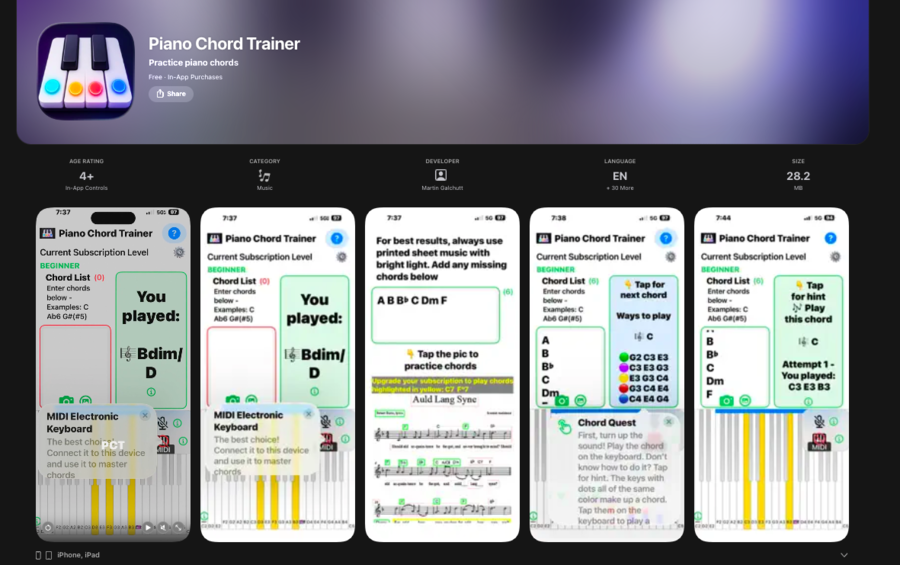
Unlike many music-learning apps that focus mainly on theory or memorization, Piano Chord Trainer helps users practice chords on an acoustic piano, electronic keyboard, MIDI device, or the app’s built-in on-screen keyboard. The app listens, analyzes the notes played, and provides immediate visual feedback to help users recognize mistakes, strengthen technique, and build confidence.
“Many aspiring musicians learn melody but struggle when it comes to harmony, accompaniment, and chord fluency,” said Martin Galchutt, creator of Piano Chord Trainer. “I created Piano Chord Trainer to help musicians connect what they see in lead sheet music with what they hear and physically play on the keyboard.”
Learning Through Real Performance
Piano Chord Trainer was built around a simple goal: helping musicians learn chords by actively playing them. The app combines flashcard-style exercises, color-coded feedback, and guided practice tools to support skill development across key areas, including:
• Chord recognition
• Chord inversions
• Slash chords
• Arpeggios
• Left-hand accompaniment
• Sight-reading support
• Ear training
• Harmonic understanding
The platform is designed for a wide range of users, from beginners learning basic chord shapes to advanced musicians improving accompaniment and performance fluency.
Real-Time Chord Recognition
One of Piano Chord Trainer’s key features is its ability to recognize multiple notes played at the same time and identify chord structures in real time. This allows users to receive instant feedback while practicing on real instruments, helping bridge the gap between theory and practical performance.
By focusing on active practice instead of passive instruction, Piano Chord Trainer helps users develop both musical understanding and physical keyboard skills.
Built for Students, Teachers, and Schools
Piano Chord Trainer also supports music educators and institutions looking for structured piano-learning tools. The app can be used in private lessons, classrooms, and independent practice sessions, offering guided exercises and scalable learning support.
With support for more than 30 languages, Piano Chord Trainer is reaching learners across multiple countries and continues to expand its global user base.
Availability
Piano Chord Trainer is available now on the Apple App Store for iPhone and iPad. Users can begin with a free trial and choose subscription levels based on their skill level and learning goals.
Download Piano Chord Trainer:
https://apps.apple.com/app/piano-chord-trainer/id1606790613
About Piano Chord Trainer
Piano Chord Trainer is an iOS music education app created by Martin Galchutt to help musicians learn piano chords through real-time feedback, active practice, and interactive performance exercises. Designed for use with acoustic pianos, electronic keyboards, MIDI devices, and on-screen instruments, the app helps students connect notation, chord recognition, and hands-on playing in one practical learning experience.
Media Contact
Martin Galchutt
Piano Chord Trainer
Website: https://pianochordtrainer.godaddysites.com
App Store: https://apps.apple.com/app/piano-chord-trainer/id1606790613
Press Inquiries:
For interviews, demonstrations, partnerships, educational licensing opportunities, or media inquiries, please contact the development team through the official website.
—
For the original version of this press release, please visit 24-7PressRelease.com here
Legal Disclaimer: This article was provided by an independent third-party content provider. Kyrion Media makes no warranties or representations in connection with it. All information is provided “as is” without warranty of any kind. This content may not have been reviewed by our editorial staff and is published automatically. The views expressed in this article are those of the author and do not necessarily reflect the views of Kyrion Media. All trademarks are the property of their respective owners. If you are affiliated with this article and would like it removed, please contact retract@kyrionmedia.com.